
THE SHORT ANSWER
Roblox GloryBound codes include ABILITY and UPDATE_3 for 5 Lucky Spins each, TRIALS for 1 Legendary Chest, BERSERKER and BOSS for 1 Epic Chest each, and UPDATE for 1,000 Cash. Finish the tutorial and your first arena fight, then open the gift icon or press J, select Codes, and enter each code separately.
GloryBound codes and rewards
Copy each code into the game's redemption field:
ABILITY— 5 Lucky Spins.UPDATE_3— 5 Lucky Spins.TRIALS— 1 Legendary Chest.BERSERKER— 1 Epic Chest.BOSS— 1 Epic Chest.UPDATE— 1,000 Cash.
Keep the underscore in UPDATE_3. Enter one code at a time, without spaces or the backticks used to display it here.
How to redeem GloryBound codes
First, open GloryBound by SphereX Studio on Roblox. Finish the opening tutorial and your first arena fight to unlock the rewards menu. If the gift icon is missing, complete those steps before looking for the code field.
- In the game, select the gift icon at the top left, or press J on a keyboard.
- Select the Codes tab in the Daily rewards window.
- Paste
ABILITYinto Enter a code. - Select the yellow Redeem button.
- Repeat with each remaining code in the list above.
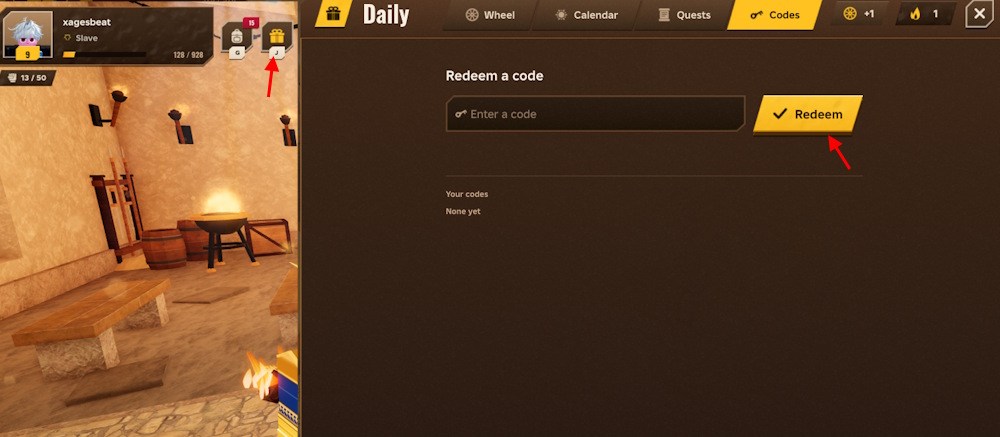
The red arrows mark the gift icon and Redeem button. Open the full-size screenshot to inspect the controls on a smaller screen.
On a phone or tablet, use the on-screen gift icon instead of the keyboard shortcut. Redeem these codes inside GloryBound through the menu pictured above.
Watch the GloryBound video guide
Play the GloryBound guide by ItzVexo below for codes, class choices and beginner tips. Use the code list above when entering rewards: older videos can show codes that have since expired.
Open this video on YouTube if the player is unavailable.
Why is a GloryBound code not working?
No gift icon or Codes menu? Complete the tutorial and the first arena fight. Unlocking the menu comes before entering a code.
The menu opens, but the code fails? Check the complete spelling, remove spaces before and after it, and preserve the underscore in UPDATE_3. Submit each code on its own.
The same code worked earlier? Check the Your codes area shown in the screenshot for your redemption history. A code already claimed on your account does not provide another reward by entering it again.
A correctly entered code is still rejected? Check the developer's latest announcements for a replacement or expiry update rather than repeatedly trying the same string.