The Alpine browser game turns a mountain climb into a small act of repair. You are heading upward with a practical job to do, and the interesting questions are about routes: where you can reach, how two places connect, and what you should examine before moving on. It is an appealing premise for anyone who likes a puzzle to feel like part of a place.
This guide helps you prepare for that mix of movement and cable work. It includes creator-published controls and known issues, followed by our own planning suggestions. It is a beginner's companion rather than a completed walkthrough, and it leaves the discoveries on the mountain for you to make.
What is the Alpine browser game?
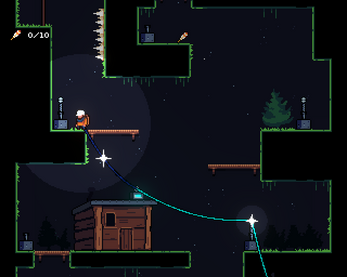
On the original itch.io page, Oddly Shaped Pixels describes a short 2D puzzle platformer about restoring a mountain's fiber network after a storm. Climbing, linking homes with cables, and talking with residents form the premise. The source lists browser, Windows, and macOS versions.
That combination gives you two useful ways to read the scenery. As a platformer, it invites you to look for places to stand and routes through space. As a connection puzzle, it invites you to consider which places should belong to the same network. Our suggested approach is to keep both questions in mind rather than treating one as an interruption to the other.
You do not need technical networking knowledge to start thinking about connections. The more useful habit is to trace a route carefully and check what is actually available in front of you.
Take a moment to get your bearings
Before attempting a complicated route, become comfortable with movement somewhere forgiving. Notice how far a short input moves you, where a jump begins, and how the camera presents nearby space. You are gathering a feel for the controls, not trying to prove that you can clear a difficult gap immediately.
Then look around for the elements relevant to the current task. Separate places you can safely stand from objects you can interact with. A destination may be easy to see but awkward to reach, while a convenient ledge may offer a better view of the problem without being the destination itself.
Our advice is to make your first goal small: reach a stable position and identify the next useful interaction. Breaking a climb into readable segments keeps a distant objective from overwhelming the decisions you need to make now. It also gives you a natural place to reconsider a route before adding more complexity.
Keyboard and controller controls
The creator publishes these keyboard controls:
- WASD or arrow keys to move.
- Z to jump.
- X to interact, including cable and connector actions.
The listed controller layout uses the left stick or directional pad for movement, A for jumping, and X for interaction. The source describes interaction as pulling, connecting, or cutting a cable and picking up or placing a connector.
We recommend learning the keyboard layout first for browser play. Keep one hand on movement and the other on the action keys in a position that feels comfortable. Before combining inputs, try each action separately so you can tell an unfamiliar response from a mistimed sequence.
Plan a connection before taking the long route
Our cable-planning suggestion is to start with the endpoints. Identify the two places you are trying to connect, then consider the route between them. Looking only at the nearest interactive object can leave you solving a local problem without knowing how it serves the larger connection.
Ask three questions: where does this route begin, where does it need to finish, and which part seems uncertain? The uncertain part might be reaching a ledge, recognizing the right interaction, or understanding how your current setup relates to the destination. Give that uncertainty your attention before committing to several additional steps.
For example, imagine two possible paths: one has an obvious landing area but requires more interactions, while the other looks shorter yet contains a jump you do not understand. This is a hypothetical planning exercise, not a description of a specific puzzle. Testing the uncertain jump first may help you choose a route without mixing movement difficulty with connection decisions.
Avoid assuming that a cable behaves exactly as it would in another game. Read the local cues, observe what changes after an action, and use that result to refine your plan. A useful route is one you can explain, not merely one that looks tidy in a screenshot.
Make each jump answer a clear question
Before jumping, choose a landing point rather than an approximate direction. Then work backward: where should you start, and which input are you going to change if the attempt falls short? Having an answer makes a missed jump informative.
If several attempts fail, vary one thing at a time. Try changing the takeoff position before changing the whole sequence. If that does not resolve the uncertainty, examine the timing separately. Randomly altering direction, timing, and interaction together makes it much harder to recognize what helped.
Look at the next stable position too. Reaching a ledge is only useful if it gives you a sensible next action. This is particularly worth considering when you are also thinking about an object or a connection: a successful jump and a useful arrival are related, but they are not identical.
You can also pause between attempts to reread the scene. Repetition can narrow your attention until the difficult gap becomes the only thing you notice. A fresh look may reveal that your chosen approach needs reconsidering, even without any new information on screen.
Keep the network problem readable
An effective mental map does not need every detail. Track the current starting point, the next destination, and any unresolved interaction. If you like taking notes, use a few words or a simple sketch rather than a complete diagram of the mountain.
After a meaningful action, check the result before moving away. Ask what changed, which part of the task remains open, and whether the next move follows from that change. This habit helps you avoid carrying an old assumption into a new situation.
Treat conversations and visible instructions as part of your observation. If the game gives you context, read it before deciding that a scene is only a movement challenge. At the same time, resist turning every decorative detail into a puzzle rule. Let the interface and the result of your actions guide the distinction.
For a first session, choose progress over perfection. Understanding how to continue is a useful goal in its own right; you can decide later whether you want to explore more thoroughly.
Know the published limitations
The creator warns that frame-rate drops can cause wall or platform physics problems. The browser build also has reported controller delays and occasional missed inputs. These are source-reported issues, not problems we have independently reproduced across devices.
If movement feels inconsistent, first reduce unrelated work your device is doing and try a straightforward input test. Switching to the keyboard may help you separate a controller issue from a puzzle question. These steps are troubleshooting suggestions, not guaranteed fixes.
Be careful before reloading: this guide does not verify how progress survives a refresh. Check the game's own instructions or current source notes if retaining your session matters. Downloadable versions may be another option, but read their current requirements rather than assuming they behave identically to browser play.
Is Alpine a good fit for your next break?
Consider it when you want a compact game with a clear sense of purpose and some hands-on movement. The repair premise suits a player who enjoys tracing relationships through an environment instead of selecting answers from a menu.
If your preferred puzzles let you sit with a board and consider every move without coordinating a jump, Rulehouse may be a better match for that mood. If organizing a workspace sounds more appealing than climbing, browse Peggy's Post. The useful comparison is the kind of attention each game asks for, rather than which one is universally easier.
Frequently asked questions
Where can I play Alpine?
Use the play button to open Oddly Shaped Pixels' original page. This catalog presents the game and its source; it does not distribute a copied build.
Is this a networking simulator?
We approach it as a puzzle platformer with a connection theme. Do not expect this guide to teach real fiber installation or technical troubleshooting procedures.
Can I use a controller in the browser?
A layout is published, but read the limitations above before choosing it. For a first attempt, our recommendation is to keep the keyboard available so you have a clear alternative if inputs feel unreliable.
Will it work on my phone?
Touch play has not been verified for this listing. A mobile-friendly article is not a guarantee of a mobile-friendly game. Check the original page for any current device guidance.
Does this page reveal the ending?
No. The advice focuses on planning, observation, and input habits rather than describing the final route or revealing story outcomes.
Try the Alpine browser game when you feel like giving your next climb a purpose. Start with one reachable destination, trace one sensible connection, and let the mountain become clearer a step at a time.